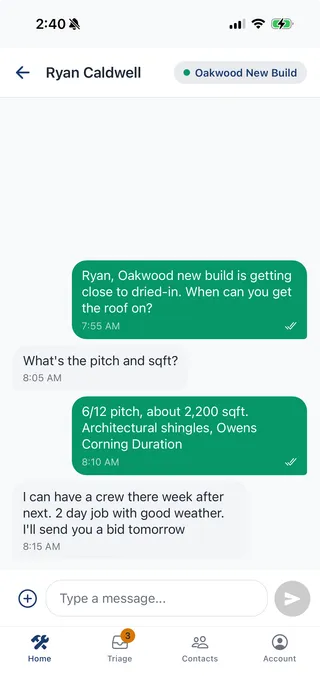
01
Text with the project in view
See which crate a conversation belongs to while you read and reply.
Public launch in preparation
A dedicated work number. Conversations grouped into crates by project, client, or event. Your personal inbox stays personal.
For people juggling clients, projects, and a lot of texts.
Clients keep texting normally. No app for them to install.
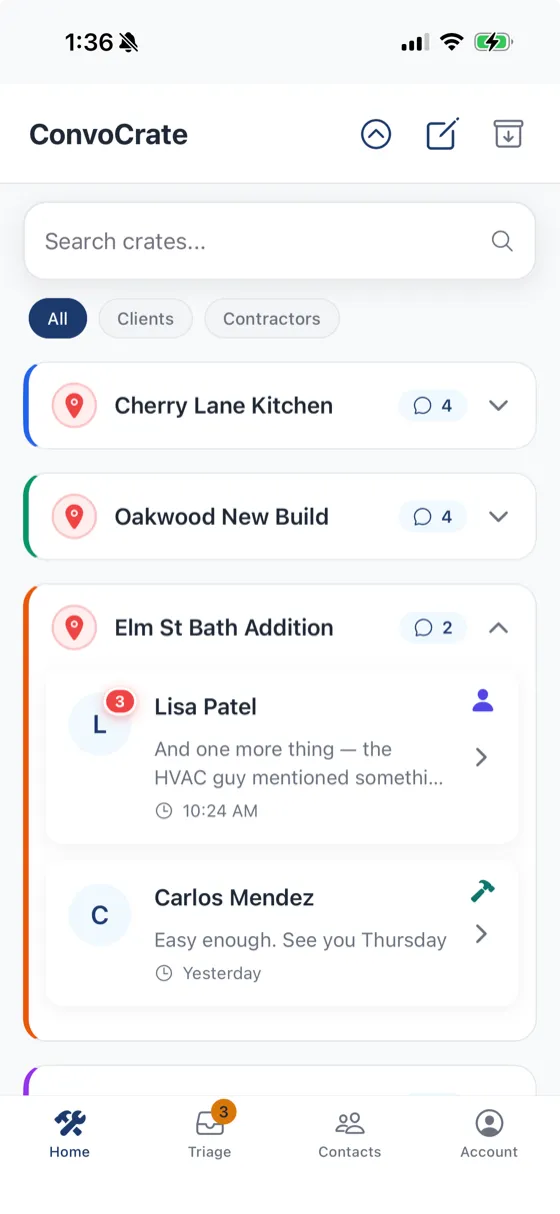
One crate for each engagement.
The conversations stay together.
Actual app screenshot · construction example
THE SAME CONTACT. DIFFERENT PROJECTS.
A crate is a home for the conversations around one piece of work. Explore an example from your world.
TWO CRATES, ONE CONTACT
Alex · Electrician
Alex · Electrician
One electrician. Two jobs. Keep the inspection update with the kitchen remodel, without mixing it into the new build.
A short reply may not identify the project. ConvoCrate has a triage inbox for messages that need your attention. Review the context and choose where they belong.
TWO CRATES, ONE CONTACT
Alex · Second photographer
Alex · Second photographer
One collaborator. Two shoots. Keep wedding logistics separate from next week’s studio schedule.
A short reply may not identify the project. ConvoCrate has a triage inbox for messages that need your attention. Review the context and choose where they belong.
TWO CRATES, ONE CONTACT
Alex · Florist
Alex · Florist
One vendor. Two events. Keep the reception delivery details with the reception, not the fundraiser.
A short reply may not identify the project. ConvoCrate has a triage inbox for messages that need your attention. Review the context and choose where they belong.
Illustrated workflow with fictional messages, not a live app session. These examples explain the use case; routing can need your review.
Use a new US business number in ConvoCrate. Share it with clients and collaborators.
Name a crate for a job, shoot, or event. Keep the relevant conversations together.
Find a project or contact, reopen the thread, and get back to the details.
INSIDE CONVOCRATE
A closer look at the existing app. Screens below show construction examples.
01
See which crate a conversation belongs to while you read and reply.
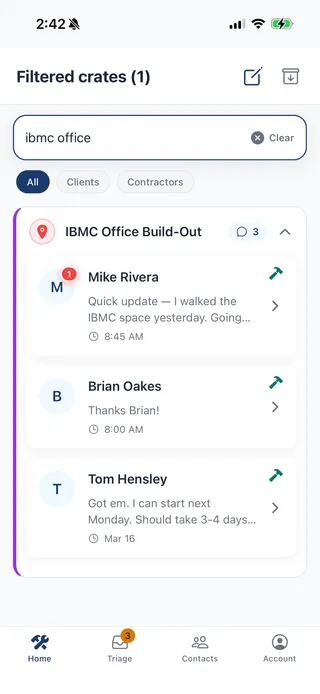
02
Filter your crates to get back to the project and its conversations.
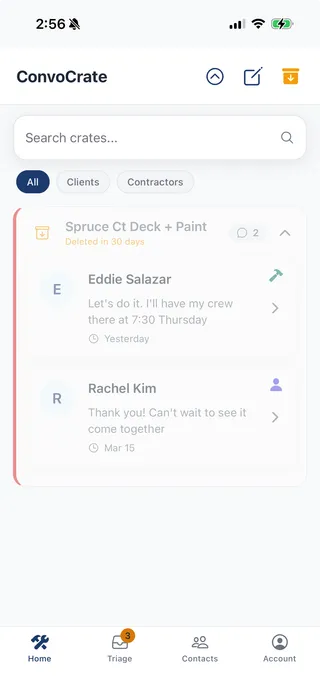
03
Archive finished crates to clear your workspace. Restore them within 30 days; archived crates are then deleted.
PROPOSED LAUNCH PLANS
Tell us whether one of these plans fits your business.
Public signup is coming. Joining the interest list is free.
FOR YOUR OWN BUSINESS
$29 / month
Your work conversations, in one place.
FOR WORK YOU DO TOGETHER
$49 / month
A shared business account, individual numbers.
Additional users: $15/month each, with 200 more pooled credits.
What’s a messaging credit? The proposed allowance counts both incoming and outgoing messages: 1 credit per SMS segment, 3 per MMS message, per recipient. Long texts and emoji can use multiple SMS segments. Final usage terms will be confirmed before purchase.
No payment today. These are proposed USD prices, before any applicable tax. No subscription or app access is created by this form. At launch, billing will begin only after your number is approved and the promised service is ready to use.
BEFORE YOU JOIN
Public access is not available yet. iPhone and Android builds currently require invitations. This list lets you express interest in the proposed paid plans and hear when signup opens.
No. They send normal texts to your ConvoCrate business number. You manage those conversations in ConvoCrate.
No. ConvoCrate assigns a new business number. Existing personal texts stay in your phone’s messaging app. Number transfers and personal-message imports are not part of the initial offer.
US businesses coordinating work through text. The initial signup is planned for businesses with an EIN, subject to carrier approval. You can still register interest if you don’t have one; tell us in the form. Don’t send your EIN here.
There is no charge or payment information collected now. At launch, the plan is to start billing only when your business number is approved and the promised app functionality is ready. Carrier approval is required; there is no guaranteed activation date.
ConvoCrate focuses on organizing work conversations. It does not replace invoicing, contracts, scheduling, photo galleries, or legal case-management tools.
HELP SHAPE THE LAUNCH
Tell us what you do and whether the proposed price fits. We’ll use your feedback to shape the launch and email you when signup opens.
No payment details
No subscription or commitment
No sales call required
Public access is coming for iPhone and Android. The initial offer uses new US business numbers and requires business registration and carrier approval.